TIDY Concierge
The Concierge combines our AI agent with 24/7 humans to help.
AI can make mistakes. Please verify important information.
Notifications
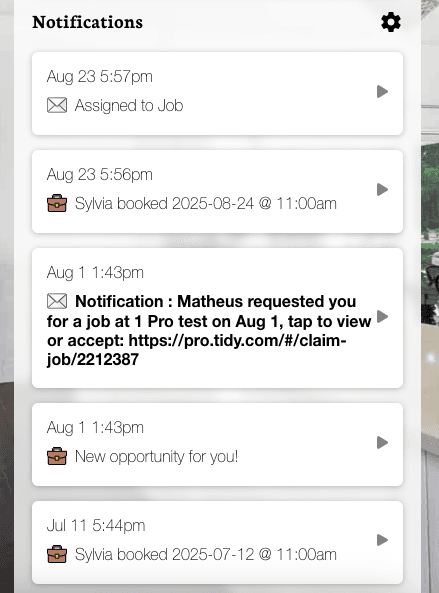
You can get multiple notifications from your TIDY app, such as Jobs Booked, Tomorrow’s cleaning reminder, Job delegation Request, Job cancelled, or Payment-related ones, for example.
You can change your preferences at any time. To do this, access your app’s "More" section and tap Notification Settings, or click on the gear icon right next to Notifications on the Dashboard.
On the Notifications Settings screen, you can see all the notification types available, separated by cards. The checkboxes available will determine how you will receive those notifications - it can be by Email, Phone Call, SMS, or App. You can select the desired option for each type of notification.
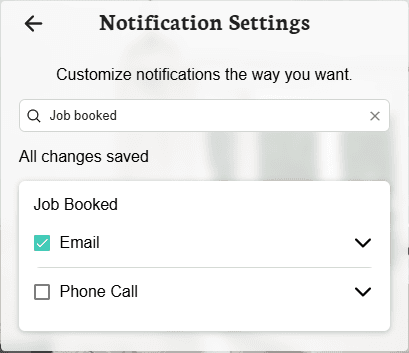
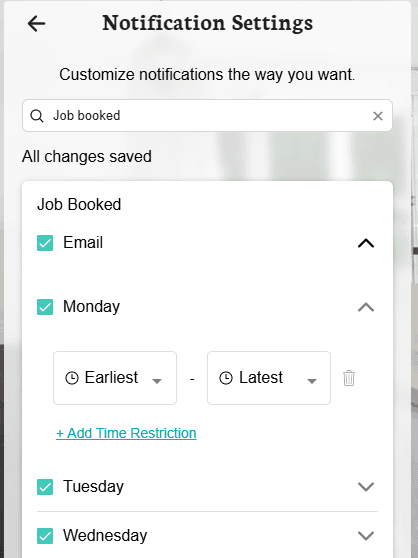
You can limit what days and times each type of notification is sent to you - you can set up Booked Jobs notifications to be sent every day only after 8:00 am, for example.
To do this, tap on the notification type (Email, Phone Call, App) and select the days. Then, tap one each day and +Add Time Restriction to limit the time frame during which you wish to receive the notifications.
On your Dashboard, you can get a clear view of all your notifications. Just tap on any of them to see more details.