
TIDY Concierge
The Concierge combines our AI agent with 24/7 humans to help.
AI can make mistakes. Please verify important information.
Dashboard
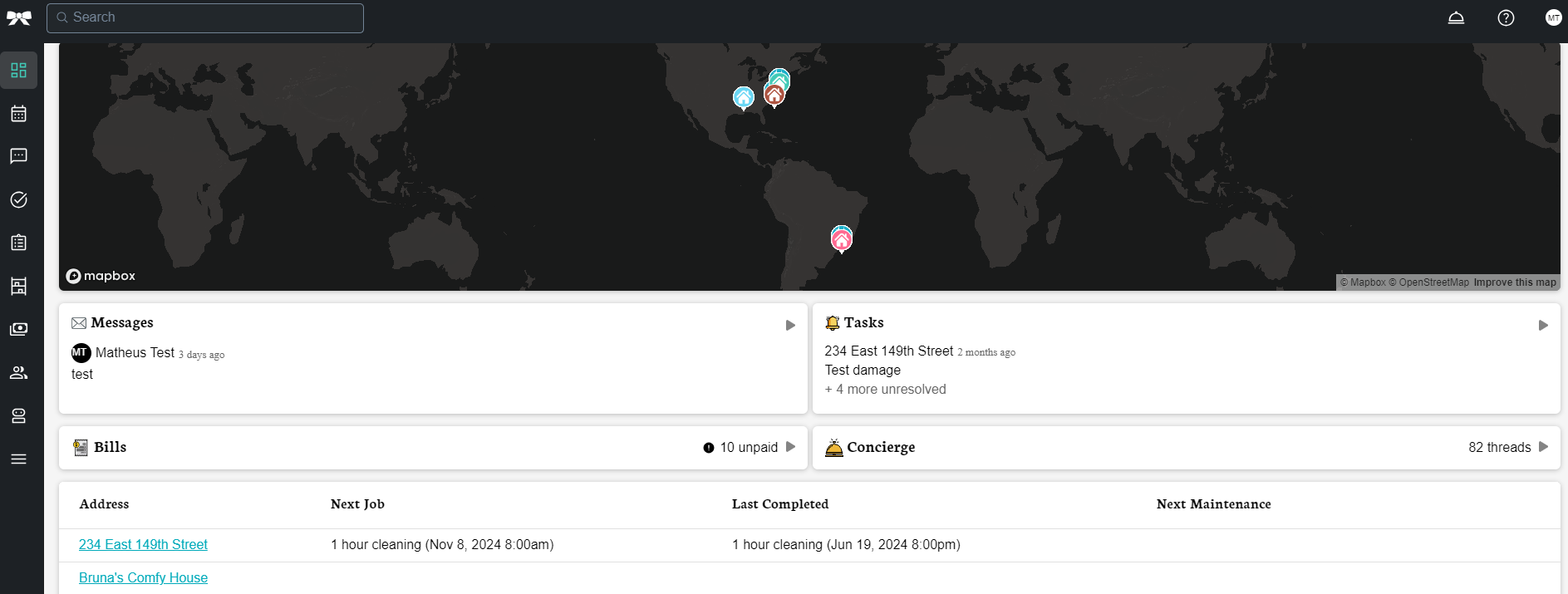
The Dashboard is your central hub for managing all your properties. It provides a map-based overview of your portfolio, quick status cards for each property, agent cards that summarize what’s happening across your account, and an AI assistant to help you take action. From the Dashboard you can monitor jobs, messages, billing, maintenance, and more — all in one place.
Getting Started
When you first log in, the Dashboard will guide you through adding your first property. You’ll see a simple form where you can type your property address — it uses Google Maps autocomplete, so just start typing and select the right address from the suggestions. If you already use a property management system (PMS) or booking channel, you can also import your properties directly from that integration instead of adding them one by one.
Dashboard Layout
Navigation Sidebar
The left sidebar (on desktop) provides access to all major sections:
- Overview - The main dashboard view (you are here)
- Schedule - View and manage your job calendar
- Messages - Communication with pros and team members
- Bills - Track invoices and payments
- Restocking - Manage inventory and supplies
- Maintenance - Track maintenance items and schedules
- Assets - Manage property assets and equipment
- Checklists - Create and manage cleaning/inspection checklists
- Upsells - Additional service offerings
- Pros - Manage your service professionals
- Automations - Set up automated workflows and agents
- Users & Teams - Manage team members and permissions
- Integrations - Connect your PMS, booking channels, and smart devices
- Account Settings - Update your profile, notifications, and preferences
Map View
The main area displays an interactive map showing all your properties. Each property is marked with a pin with its address label. Click any pin to select that property and see its details. If you have many properties, nearby pins will cluster together automatically — zoom in to see individual properties.
The map also shows live weather overlays (rain, snow, fog) based on your property locations, so you can plan around weather conditions at a glance.
Selecting a Property
There are two ways to select a property on the Dashboard:
- Click a map pin — click any property marker on the map
- Use the dropdown — use the property selector dropdown at the top of the page to search and pick a property by name
The dropdown is especially useful on mobile or when you have a large number of properties and don’t want to pan around the map.
Property Pulse
When you select a property, the Property Pulse panel shows a timeline of everything happening at that property. This gives you a complete picture without having to visit multiple pages.
The Property Pulse shows:
- Property Info — Name, summary, and quick stats
- Upcoming Jobs — Your next scheduled cleaning or maintenance job
- Past Jobs — Recently completed jobs and their status
- Open Issues — Any unresolved maintenance issues or concerns
- Access Notes — How to enter the property (lock codes, gate codes, key location). This is especially useful to review before sending a pro to the property.
- Unpaid Bills — Outstanding invoices for this property. Click to go directly to the billing page.
- Low Inventory — Items that have fallen below the minimum stock level you set. Click to manage restocking.
- Maintenance Due — Upcoming or overdue maintenance items
- Location Data — Current weather, local events, and property codes for the area
- Custom Fields — If you use a PMS integration, any custom fields from your PMS will also appear here
Quick Actions
From the Property Pulse, you can quickly:
- Book a Job — Start the booking flow for a cleaning or other service
- Add a Job — Schedule a new job for this property
- Log a Job — Manually record a job that was already completed
- Set Up Smart Suggestions — Enable AI-powered scheduling recommendations for this property
Managing Properties from the Dashboard
- Add a property— Click the "+" button to open the add property form
- Edit a property — Select a property and click edit. On desktop, this opens in a side panel so you can keep the map visible. On mobile, it opens as a full page.
- Delete a property — Open the edit page for a property and scroll down to find the delete option. You’ll be asked to confirm before anything is removed.
Agent Cards
Agent Cards sit along the bottom of the Dashboard and give you at-a-glance summaries of what’s happening across your account. Each card focuses on a different area so you can spot issues without navigating away from the Dashboard.
- Schedule Agent — Shows how many jobs you have today, any pending requests, and scheduling conflicts that need attention
- Messages Agent — Shows your unread message count and any recent AI-suggested responses
- Bills Agent — Shows the number of unpaid invoices waiting for your review
- Restocking Agent — Shows which properties have items running low on stock
- Usage Summary — A chart showing your overall usage and activity trends
- Issues Agent — Shows open reported maintenance issues (disabled by default)
- Upsells Agent — Shows available add-on services you could offer (disabled by default)
- Job Quality Agent — Shows quality metrics for completed jobs (disabled by default)
- My Pros Agent — Shows a summary of your pros’ status and availability (disabled by default)
- Maintenance Agent — Shows upcoming maintenance tasks across all properties (disabled by default)
Some Agent Cards are turned off by default.To enable them, go to Settings > Agents and turn on the ones you want. Once enabled, they’ll appear on your Dashboard automatically.
On mobile, you can swipe horizontally through the Agent Cards. On desktop, they appear in a row along the bottom of the screen.
AI Assistant
At the bottom of the screen, you’ll find the AI assistant with a prompt that asks "What can we do for you?" (or "What can we do for [property name]?" when viewing a specific property).
You can type natural language requests like:
- "Schedule a cleaning for next Tuesday"
- "Show me all unpaid bills"
- "Find a pro available this weekend"
- "Check the maintenance schedule for this property"
Desktop vs. Mobile
The Dashboard adapts to your screen size:
- Desktop: The map takes up most of the screen. The navigation sidebar is on the left. When you select a property or click a job, details open in a side panel on the right so you can keep the map visible.
- Mobile: The map is full-screen. At the top, you’ll see a floating header with a property selector dropdown, a search icon, and a notification badge. Agent Cards appear at the bottom and can be swiped horizontally. When you tap a property or job, details open full-screen.
Bottom Navigation (Mobile)
On mobile devices, the bottom navigation bar provides quick access to:
- Schedule - Your job calendar
- Maintenance - Maintenance tracking
- Messages - Communication hub
- More - Additional options and settings
Reports
The Dashboard includes built-in reports that let you see data across all your properties at once. Each report shows a table of data, and some reports also include a map view.
There are four report categories:
- Overview — A high-level summary combining jobs, maintenance, and property status. Only one Overview report can exist on your Dashboard.
- Jobs — Upcoming scheduled jobs and job requests across all properties
- Maintenance — All upcoming maintenance suggested by manufacturers and experts
- Reservations — Guest bookings synced from your PMS or booking channels
You can customize each report by showing or hiding columns, reordering them, and renaming reports to fit how you work. To customize a report, click the settings icon on the report header.
Overview Report
The overview report has the most dynamic map of all the reports. On the map, it will show:
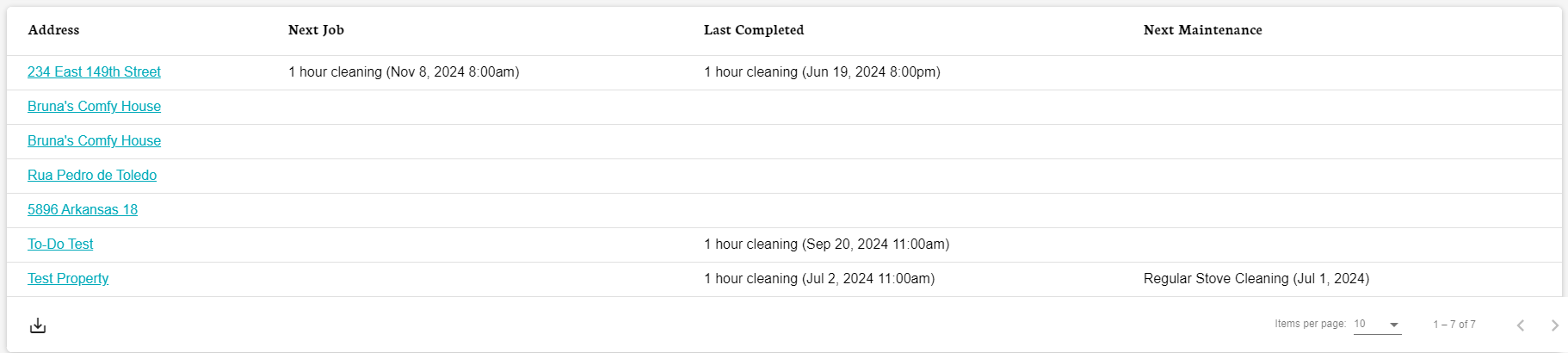
- Your addresses
- The next job scheduled for each address
- The last completed job
- Next or last maintenance completed on each property
Using the Dashboard
- The dashboard auto-refreshes to show current data
- Click any property marker on the map to view its details
- Click any status card to drill into a detailed view
- Use the AI assistant for quick actions without navigating away
- Use the sidebar or bottom navigation to access other sections