
TIDY Concierge
The Concierge combines our AI agent with 24/7 humans to help.
AI can make mistakes. Please verify important information.
Assets
The Assets section is a comprehensive asset management and preventive maintenance system that helps you track property assets, schedule recurring maintenance, and ensure nothing gets overlooked.
Assets Management
Assets are physical items at your properties that require maintenance (HVAC systems, appliances, pool equipment, etc.).
Asset Information Tracked
- Asset name and category (appliance, system, equipment)
- Installation date and warranty information
- Location (property, room)
- Manufacturer and model details
- Photos and documentation
- Purchase price and replacement cost
- Current condition and status
- Maintenance history log
Benefits of Asset Tracking
- Know what maintenance is due and when
- Track lifecycle and replacement timing
- Maintain warranty compliance
- Plan capital expenditure budgets
- Ensure regulatory compliance (fire extinguishers, smoke detectors, etc.)
Recurring Maintenance
Set up automated maintenance schedules for each asset or property area.
How Recurring Maintenance Works
- Define maintenance item (e.g., "HVAC Filter Replacement")
- Set recurrence pattern (monthly, quarterly, annually, custom)
- Assign to specific asset(s)
- System auto-generates maintenance items based on schedule
- Items appear in Schedule and Maintenance sections
- Mark complete to log maintenance history
- Next occurrence auto-schedules upon completion
Common Recurring Maintenance Examples
- HVAC filter changes every 90 days
- Fire extinguisher inspections annually
- Pool maintenance weekly
- Smoke detector testing monthly
- Landscaping bi-weekly
AI-Suggested Maintenance
After you add assets to the Assets section, the system uses AI to recommend maintenance schedules.
How AI Suggestions Work
- You add an asset (e.g., "Samsung Refrigerator - Model XYZ")
- AI analyzes asset type, model, and manufacturer data
- System suggests industry-standard maintenance with recommended frequency
- Review and approve suggested maintenance schedules
- Approved items become recurring maintenance schedules
- System auto-generates maintenance items based on approved schedules
Benefits of AI Suggestions
- No need to research maintenance requirements manually
- Industry best practices built-in
- Reduces risk of overlooked maintenance
- Extends asset lifespan through proper care
- Prevents costly emergency repairs
Relationship Between Assets and Maintenance
The Assets and Maintenance sections work together to manage preventive maintenance:
- Asset recurring schedules CREATE maintenance items automatically
- Maintenance items linked to assets retain full context
- Completing a maintenance item updates the asset maintenance log
- Maintenance history feeds into asset records
- Maintenance items can be matched/assigned to specific assets
When to Use Which
- Assets Section: Set up assets, define recurring schedules, view asset history
- Maintenance Section: Execute/complete work, assign to staff, track daily operations
Assets Page
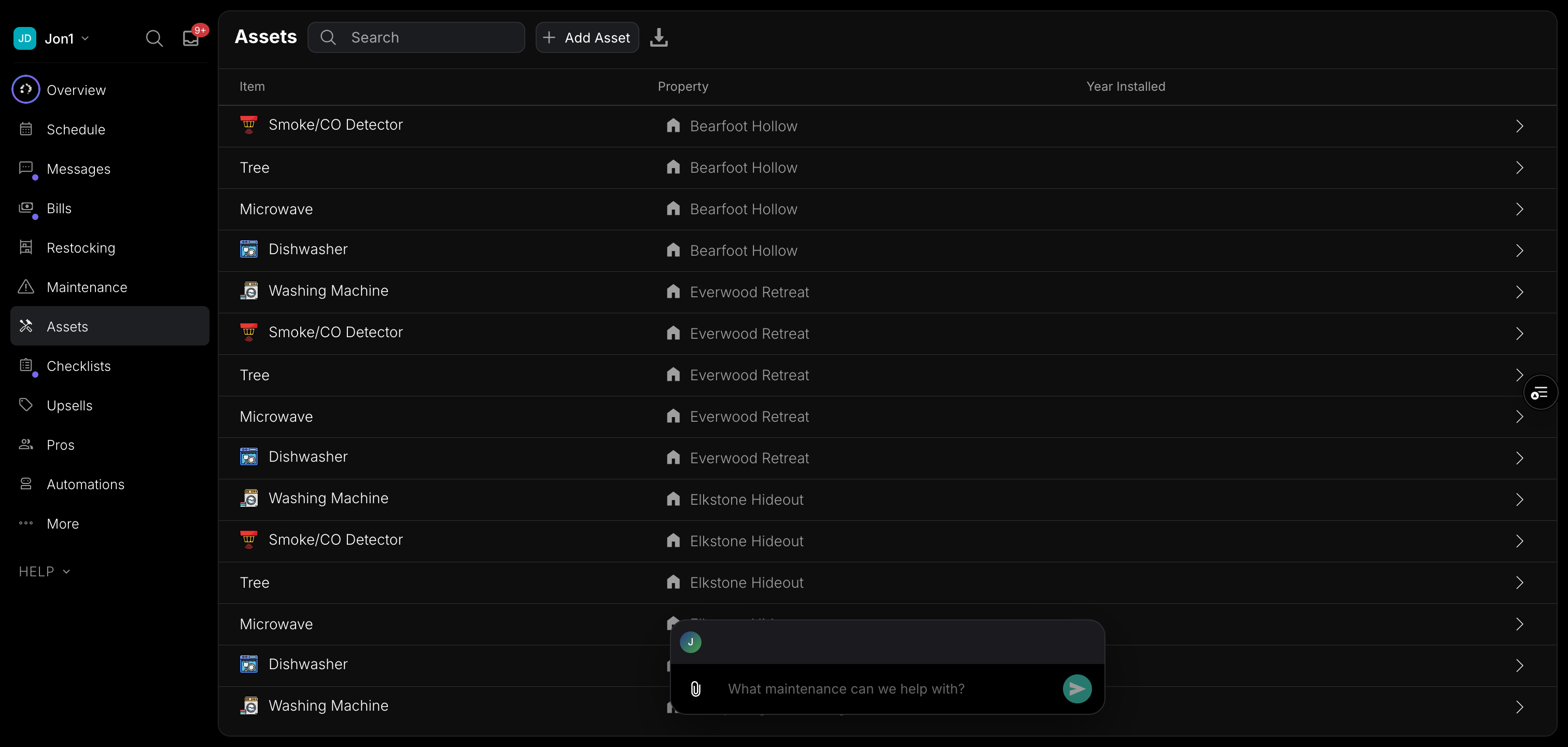
The Assets page displays all your non-consumable assets in a searchable, sortable table. Each row shows the asset name with a category icon, the property it belongs to, and the year it was installed.
- Filter by property — View all assets or just those at a specific property
- Search — Search across all asset names
- Sort — Sort by item name, property, or year installed
- Export to CSV — Download your asset list for use in spreadsheets or reports
Click any asset to see its full detail page, including upcoming and past maintenance, photos, custom fields, and quantity history. On desktop, the detail page opens in a side panel so you can keep the asset list visible.
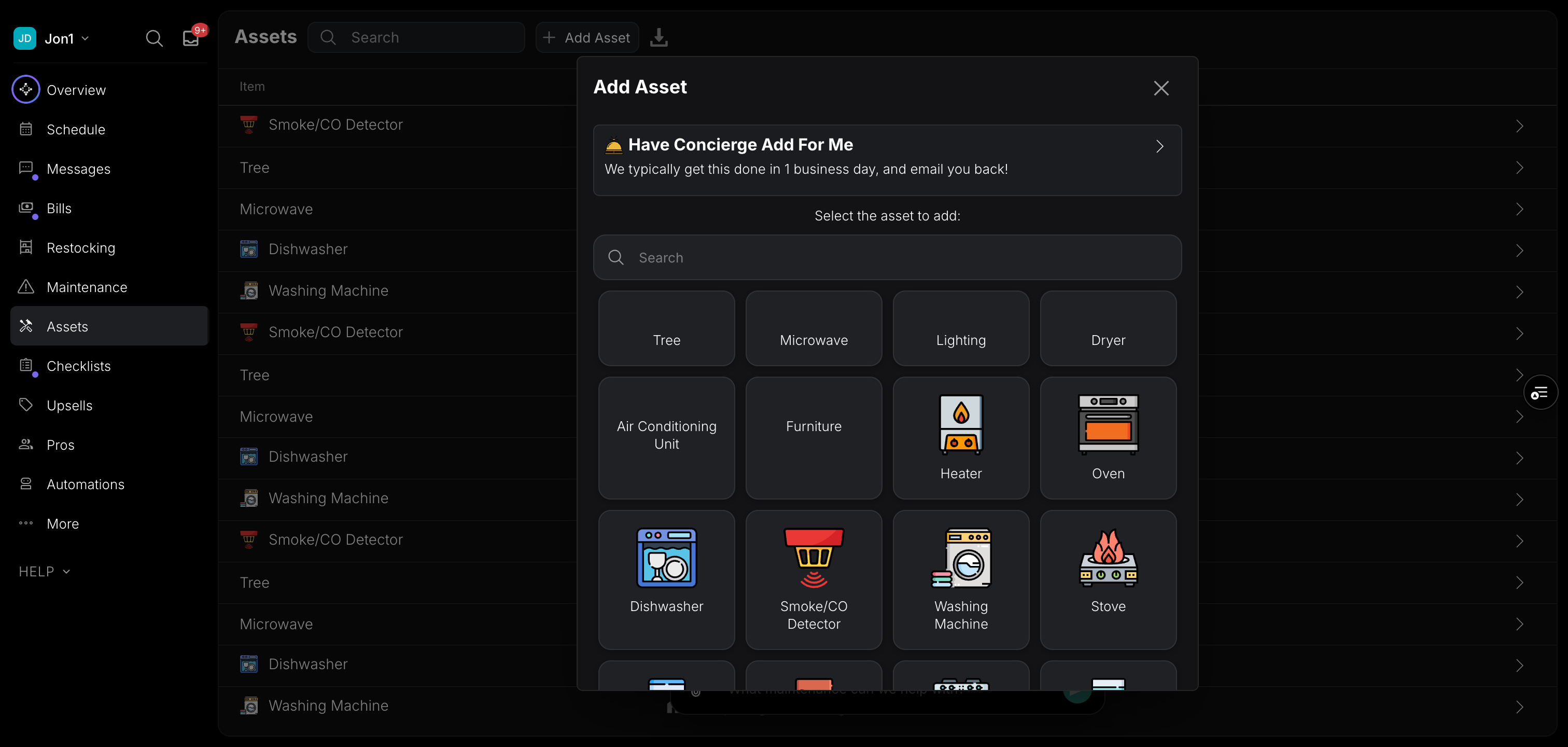
Adding Assets

Scheduling Maintenance Jobs
- From Assets section: Click asset → "Schedule Maintenance" → Creates maintenance item
- From Maintenance section: Create item → Link to asset → Appears in asset maintenance history
- From Schedule: Create job → Select "Maintenance" type → Link to asset
- Recurring items auto-appear on schedule based on recurrence pattern
Completing Maintenance
- Item appears in Maintenance or Schedule section
- Staff completes work and marks item done
- System prompts for completion notes and photos
- Completion logs to asset maintenance history
- Next recurrence auto-schedules (if recurring)
- Asset status updates based on completion
Better On-Site Tracking
Matching maintenance items to assets provides crucial operational visibility:
What You Can Track
- Asset Performance: See maintenance patterns, recurring issues
- Cost Analysis: Total maintenance cost per asset over time
- Staff Performance: Who completed which maintenance, quality indicators
- Compliance: Proof of regular maintenance for regulations/insurance
- Lifecycle Planning: Know when assets need replacement based on maintenance frequency/cost
- Problem Identification: Assets requiring excessive maintenance may need replacement
Reporting Capabilities
- Maintenance completion rates by property
- Cost per asset type
- Most maintenance-intensive assets
- Compliance status for required maintenance
- Staff utilization on maintenance
Maintenance Alerts
The system sends alerts to keep you informed:
- Upcoming maintenance due dates
- Overdue maintenance items
- Assets approaching warranty expiration
- Critical safety items (smoke detectors, fire extinguishers)
- Dashboard indicators for maintenance requiring attention