
TIDY Concierge
The Concierge combines our AI agent with 24/7 humans to help.
AI can make mistakes. Please verify important information.
Leases & Ledgers
The Leases section is your rent roll — every lease you manage, its terms, and its current balance at a glance. Open a lease to see its full ledger: every charge, fee, deposit, and payment in order, with a running balance that stays current.
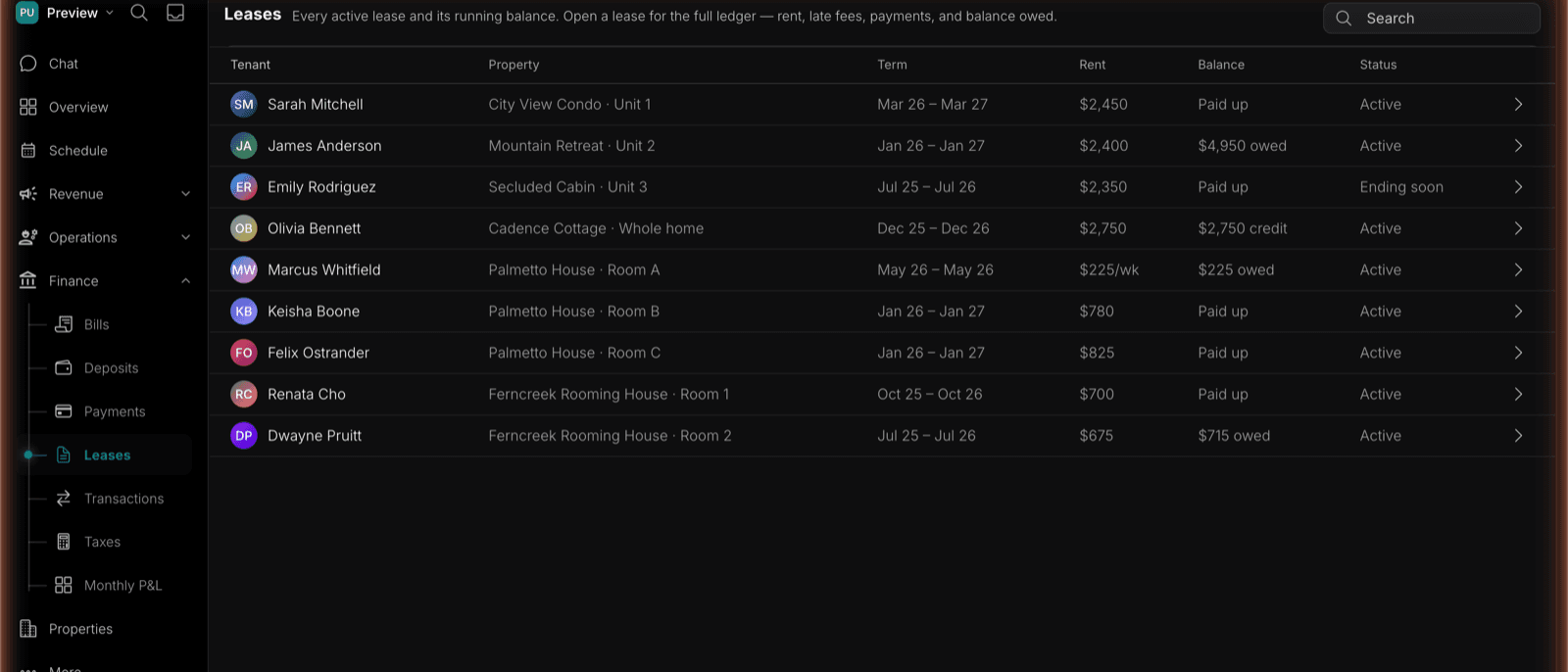
The Rent Roll
Find it under Finance → Leases (also Revenue → Leasing → Leases). Every lease appears with its Tenant, Property, Term, Rent, Balance, and Status. Balances are color-coded — red when money is owed, green when the tenant is current or paid ahead (a credit balance). It’s the single view for seeing how your leased units are doing financially.
Lease statuses
| Status | Meaning |
|---|---|
| Active | In force and current |
| Ending soon | Approaching its end date — time to renew or turn over |
| Ended | The term is over |
| Eviction | In eviction proceedings |
Housing Choice Voucher Leases
A Section 8 Housing Choice Voucher lease links three agreements: the owner-resident lease, the HUD tenancy addendum, and the owner-PHA HAP contract. TIDY tracks the signatures, approval status, effective dates, approved household, rent, utilities, and assistance status for each document without treating one signature as completion of the whole packet.
The lease header also shows the current PHA-approved monthly split:
- Approved rent to owner
- Family rent to owner
- Owner-directed HAP
- Resident-paid utilities and any utility reimbursement
Each change is effective-dated. When the PHA changes the resident/HAP split, TIDY adds the new schedule on the notice’s effective date and preserves the prior schedule so retroactive adjustments can be explained.
See Section 8 & Housing Choice Vouchers for the complete lease-up and ongoing management workflow.
The Lease Ledger
Open any lease to see its ledger — a chronological record of everything that affects the balance. Entry types: Rent, Late fee, Deposit, Utility, Payment, Credit, and Adjustment. Charges add to the balance owed; payments and credits reduce it. The ledger header summarizes total charged, total paid, and the current balance.
Each entry shows against a running balance, so you can always see what’s owed and how it got there. Record a payment or add a late fee and the balance updates live. The same ledger is reachable from the tenant’s contact record, so you can get to it from wherever you’re working.
On a voucher lease, the ledger preserves the payer on every entry. Resident delinquency uses only the approved family rent to owner and other lawful resident charges. Late or missing HAP opens a PHA reconciliation case and never increases the resident’s balance.
Ledger actions
| Action | What it does |
|---|---|
| Record payment | Logs a payment received and reduces the balance |
| Assess late fee | Applies the lease’s late-fee amount as a new charge |
| Send statement | Emails the tenant their current statement |
| Copy tenant portal link | Copies this tenant’s portal link |
Each lease stores its own late fee amount and grace days, so late fees are applied consistently against that lease’s terms.
Where the numbers come from. Rent collected in Rent Collection is credited to the linked lease ledger automatically — you never post the same rent twice — and deposits are tracked here too. The balance you see reflects real activity, not a separate spreadsheet you have to keep in sync.