
TIDY Concierge
The Concierge combines our AI agent with 24/7 humans to help.
AI can make mistakes. Please verify important information.
Rent Collection
Rent Collection is how TIDY brings money in from your guests and tenants. It’s a receivables pipeline: every payment that’s owed, overdue, or paid, each tied to a guest or tenant and their reservation or lease — so what a tenant pays flows straight to their lease ledger.
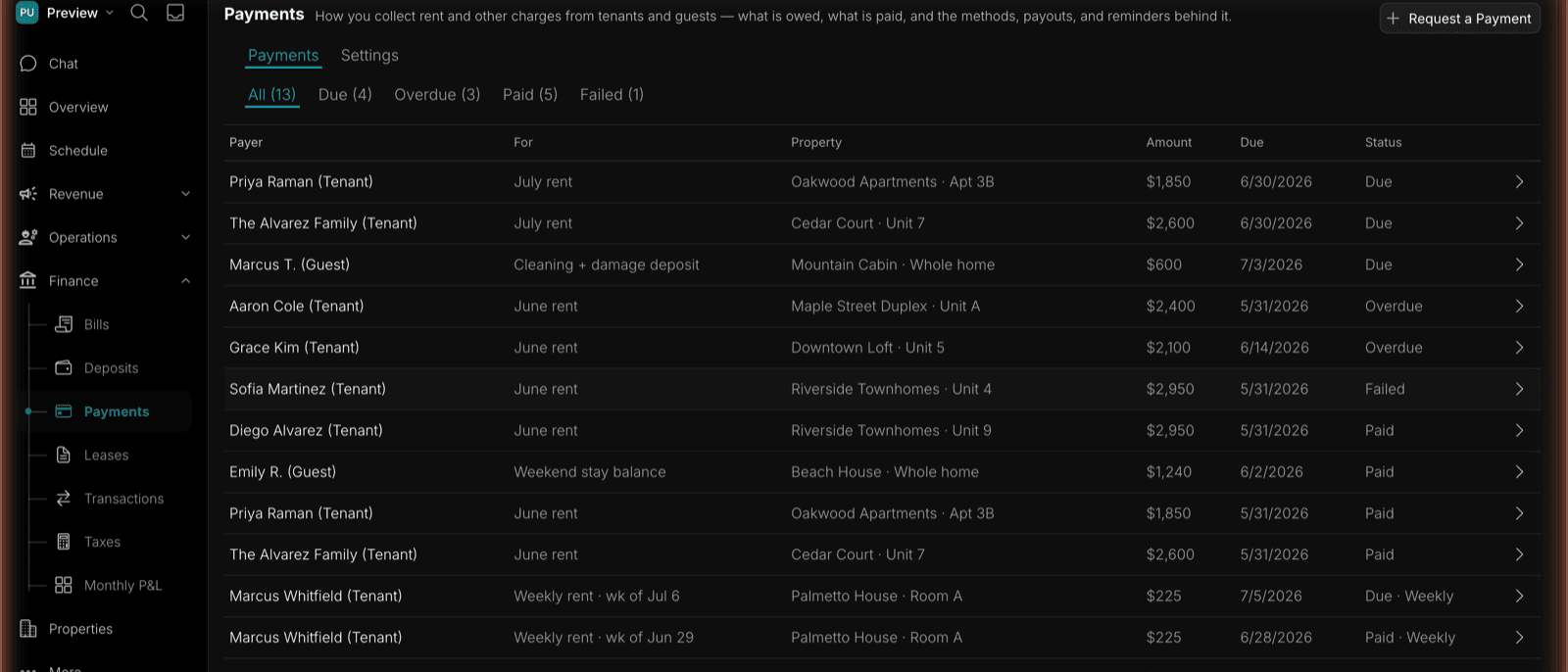
The Receivables Pipeline
The table shows Payer, For (what the payment is), Property, Amount, Due date, and Status:
- Due — upcoming, not yet paid.
- Overdue — past its due date.
- Paid — received.
- Failed — the payment attempt failed and needs a retry.
Housing Assistance Payments
A Section 8 Housing Choice Voucher lease has two payers. TIDY creates a resident receivable for the PHA-approved family rent to owner and a separate PHA receivable for the expected Housing Assistance Payment (HAP). Both roll into the same lease month without combining who owes what.
For the PHA portion, TIDY:
- Completes the approved payee and direct-deposit setup.
- Imports PHA statements, remittance files, and connected-bank deposits.
- Matches each HAP amount to the property, household, contract, and coverage month.
- Records retroactive payments, adjustments, recoupments, withholding, and abatement.
- Opens a PHA follow-up case for missing, late, short, or unexplained payments.
The resident receives payment requests and reminders only for the amount the PHA says the resident owes. TIDY never marks the resident overdue, applies a resident late fee, or sends a resident collection notice for missing HAP. Any utility reimbursement paid to the family or utility supplier is also kept separate from owner rent.
See Section 8 & Housing Choice Vouchers for PHA setup, approved rent splits, and ongoing reconciliation.
Tenant payments link straight through to the lease they belong to — click the lease label on a payment row to jump to that ledger. Each payment has:
- A branded pay page — a standalone, shareable link the guest or tenant can pay from.
- An activity timeline — the payment’s life from request created → sent to payer → opened by payer → paid.
- One-tap actions — copy the pay link, send it via Messages, or send a reminder.
Requesting Payment
You can request a payment two ways:
- Manually — create a one-off request whenever you need to collect.
- Automatically — let recurring rent generate the payment on schedule for an active lease.
Request a Payment opens a short form: payer name, payer type, property, unit (optional), what the payment is for, amount, and due date. Create & Get Link generates a hosted payment page and gives you a link to send.
The Hosted Payment Page
Every payment request gets its own branded page at a pay.tidy.com link. The payer sees what they’re paying for, the amount, the processing fee if they’re covering it, and the total — then pays by their chosen method and gets a “Payment received” confirmation. No TIDY login required.
Recording Payments
- Paid online — the payment flips to Paid automatically and credits the lease ledger.
- Paid offline — for cash, checks, and external transfers, use Record offline payment on the payment detail. It flips to Paid and credits the ledger the same way.
Payment Settings
Accepted payment methods
Each method can be toggled on or off, and you choose who pays the processing fee — pass it to the tenant or absorb it as the owner:
| Method | Notes |
|---|---|
| ACH bank transfer | Lowest cost, 3-business-day settlement. Best for recurring rent. |
| Credit / debit card | Instant, highest convenience. |
| Wire transfer | For large one-off payments (deposits, move-in). |
Processing fees vary by method — current rates are shown in the app when you enable one.
Payout account
Connect the bank account payments are deposited into and choose a payout schedule (e.g. Daily).
Payment reminders
An automatic reminder cadence, each rule individually toggleable with its own editable message:
| Rule | Default |
|---|---|
| 3 days before due | On |
| On the due date | On |
| 3 days after due | On |
| 7 days after due | On |
| 14 days after due | On |
| 30 days after due | Off |
Messages support merge fields — {tenant}, {amount}, {property}, and {link} — so each reminder carries a one-tap secure payment link.
Payment page branding
Upload your logo, set an accent color, and write the heading and subtext renters see. A live preview below the form shows exactly what the payment page will look like before you save.
You set the rules. TIDY collects rent the way you configure it — your methods, your fee policy, your reminder schedule. Payments link automatically to the right lease so your ledgers stay accurate. See Leases & Ledgers for balances and Deposits for security deposits.