
TIDY Concierge
The Concierge combines our AI agent with 24/7 humans to help.
AI can make mistakes. Please verify important information.
Optimizer
The Optimizer is where TIDY sets and continuously adjusts your pricing and availability. It works day by day: every night on the calendar has a price, a min/max stay, and a strategy — short-term, longer-term, both, or blocked — so each property earns the most it can.
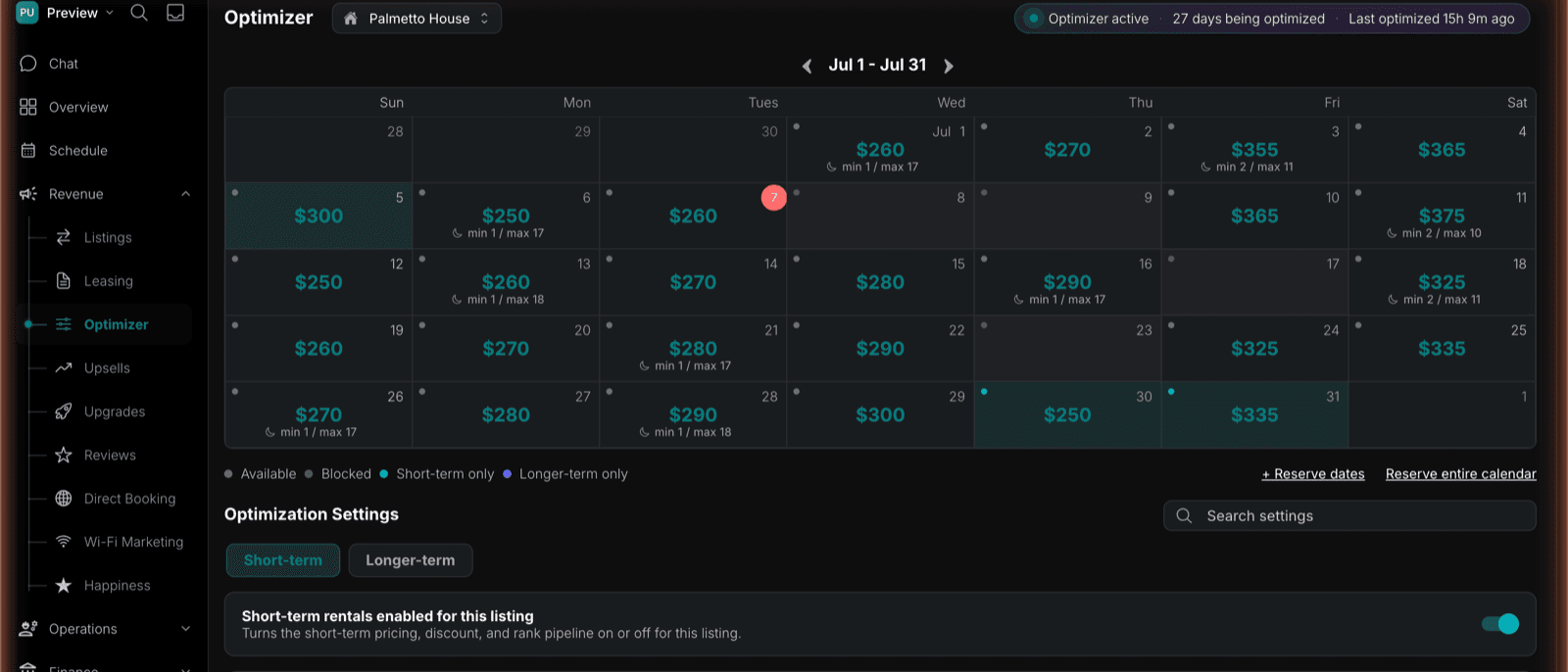
The Pricing Calendar
Each listing has a calendar showing the optimized price for every night, along with the minimum and maximum stay. A small dot on each day shows its state:
- Available — open for booking under its strategy.
- Blocked — held back from booking.
- Short-term only — available for nightly stays only.
- Longer-term only — available for longer stays only.
You can reserve individual date ranges or the entire calendar for a given strategy — for example, holding festival weekends for premium nightly rates. A header shows whether the Optimizer is active, how many days it’s optimizing, and when it last ran.
If a listing only runs one business, the calendar collapses to a simple available/blocked view — no tier chrome you don’t need.
The Day Panel
Click any date to open the day panel. It leads with Available for pills — short-term, longer-term, or blocked — which you can toggle for that date, with a range control to apply the same change across a span of dates in one action. The panel also shows, for the selected date:
- Monthly target — your mid-term and long-term rent targets.
- Your Price Limits — min and max price pills.
- Lease — if a signed lease covers that date, the tenant and a link to their ledger.
Leases Block the Calendar
A signed whole-unit lease automatically reserves its term on the calendar, so a leased property can’t be double-booked by the short-term pipeline. A room lease does not block the whole property’s calendar — one rented room in a split house doesn’t take the building off the market.
Strategy & Price Optimization
Optimization Settings split into Short-term and Longer-term tabs, each with a per-listing switch so you decide which strategies a property runs. Within them, TIDY handles two jobs:
- Strategy Optimization — decides whether a night is worth more as a short-term, mid-term, or long-term stay, and offers it accordingly. The same property can be nightly in peak season and monthly the rest of the year.
- Price Optimization — sets the nightly and monthly rates and discounts based on demand and comparable listings, and keeps your listings ranking well on each channel.
Base, Min & Max Prices and PriceLabs
Set a base, minimum, and maximum price for each listing on the Optimizer page. TIDY is the source of truth for these limits: whatever you save there is what TIDY uses, and it overwrites any matching limits stored in PriceLabs.
If you use PriceLabs for price suggestions, TIDY takes PriceLabs’ suggested price for each night and sends it to Airbnb, VRBO, Booking.com, and your direct booking site itself. That lets TIDY layer its own pricing improvements on top. Add your listing to PriceLabs as usual, but leave sync turned off for that listing. If sync is on, PriceLabs and TIDY would both write prices.
The Longer-Term Optimizer
For mid- and long-term listings, the Optimizer runs its own pipeline:
- Comps — comparable listings nearby pulled from Zillow, Apartments.com, Zumper, and Furnished Finder, with beds, baths, square footage, monthly rent, distance, and days on market, summarized into a market range.
- Target and floor rent — your monthly target and the floor you won’t go below, set separately for mid-term and long-term, plus a minimum lease length.
- Listing optimization — per channel: whether you’re listed, a listing completeness score, and concrete suggestions (“Add a floor plan photo”, “Answer 2 unanswered questions”, “Resume listing to restore search visibility”).
You set the guardrails. Enable or disable each strategy per listing, set floors and rules, and reserve dates whenever you want — TIDY optimizes within the bounds you give it. See Revenue Optimization for the bigger picture, Optimization Phases for the phase-by-phase playbook the Optimizer runs, and Listing Channels for where each strategy gets marketed.