
TIDY Concierge
The Concierge combines our AI agent with 24/7 humans to help.
AI can make mistakes. Please verify important information.
Managing Listings
Open Revenue → Listings to see every place each property is marketed — the channel, the listing ID, and its status — so you always know where a unit is live. To see the full universe of channels available for short-, mid-, and long-term rentals, see Listing Channels.
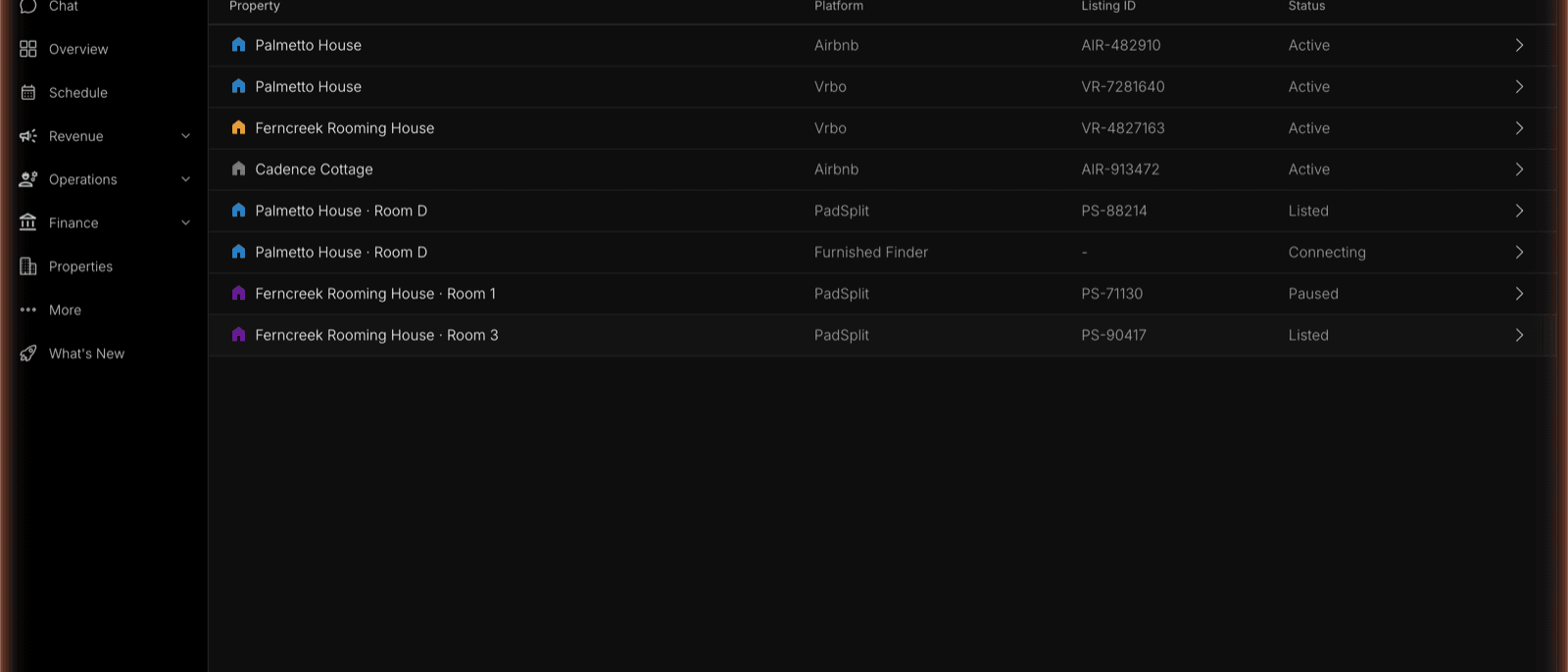
The Listings Table
Each row is one listing of one property on one channel, with its:
- Platform — Airbnb, Vrbo, PadSplit, Furnished Finder, and the other channels your strategy uses.
- Listing ID — the channel’s own identifier for the listing.
- Status — Listed · Paused · Syndicating as a listing is set up and confirmed. A channel a unit isn’t on shows as Not listed.
Adding a Listing
Use Add Listing to put a property on a new channel. Platforms are grouped by rental type, so the same flow covers every kind of tenancy:
| Category | Platforms |
|---|---|
| Short-Term Sites | Airbnb, VRBO, Booking.com |
| Long-Term Sites | Zillow, Apartments.com, Zumper |
| Mid-Term Sites | Furnished Finder |
| By-the-Room Sites | PadSplit |
Pick a category, pick a platform, and enter the listing identifier the platform asks for — a Zillow URL or ZPID, an Apartments.com or Zumper listing URL, a Furnished Finder property ID, a PadSplit property URL.
Short-Term Sites: Add TIDY as a Co-Host
Short-term sites — Airbnb, VRBO, and Booking.com — connect through a co-host invite. You invite pm@tidy.com as a co-host on the platform, and TIDY walks you through the exact clicks for that site. TIDY then polls the platform for reservations and calendar data, so the listing stays on your account and keeps syncing — nothing is moved or transferred. See Integrations for the Airbnb co-host setup instructions.
A typical go-live path is to add TIDY as an Airbnb co-host, confirm stay preferences (minimum and maximum stay), then TIDY can push the listing to additional channels — often within about a day. After you’re live, edit listings in TIDY so those channels stay in sync.
Vrbo & Booking.com: Transitioning a Listing
Vrbo and Booking.com don’t support a co-host invite the way Airbnb does, so moving an existing listing onto TIDY works differently for each.
Vrbo
Option 1 (recommended): Change the account’s email address and phone number to the ones your account manager provides. This lets TIDY handle the rest of the transition on your behalf — you won’t need to do anything further unless TIDY follows up with additional transfer instructions.
Option 2: Vrbo doesn’t allow listings to be transferred between accounts, so TIDY creates a new listing under its account instead. This needs four things from you:
- Your current booking list — guest names, dates, rates, and contact details for every reservation already on the books.
- Written consent confirming you want your reviews transferred to the new listing.
- On the agreed handover date, block all future dates on your existing listing. Block them, don’t cancel them — cancellations carry penalties on your account.
- Unpublish the existing listing once TIDY confirms the last guest has checked out.
Your existing bookings stay on your listing and are paid out to you as normal — TIDY handles those guests. Once the listing is inactive, TIDY asks Vrbo to move your review history to the new listing. Vrbo usually approves the request, but the transfer isn’t guaranteed.
Booking.com
Option 1 (recommended): Change the account’s email address and phone number to the ones your account manager provides, same as Vrbo above.
Option 2: Booking.com has a formal change-of-ownership process. This needs two things from you:
- Send one message to Booking.com Partner Support through your Extranet inbox — TIDY writes it for you, you only need to paste and send it. The message confirms the handover date and TIDY’s contact details.
- Clear any outstanding Booking.com invoices. The transfer can’t complete until the account balance is settled.
Booking.com confirms the change with both sides, then issues a new contract. Booking.com may stop displaying your existing reviews after ownership changes — TIDY asks Booking.com to confirm how your reviews will be treated before starting the transfer.
Do this early. Transitions are easiest when nothing is on the books yet. If a listing stays on your own Vrbo or Booking.com account, TIDY doesn’t see those reservations, so turnovers aren’t scheduled against them and the calendar can double-book.
Long-Term, Mid-Term & By-the-Room Sites: Syndication
Long-term, mid-term, and by-the-room sites don’t use a co-host invite. Instead, you supply the listing URL or ID and the listing enters a syndication pending state until the platform confirms it — it shows as Syndicating in the table until then.
Listing Builder
Listing Builder covers all listing fields, so you can complete a listing in TIDY without leaving channel-required details blank. When you connect an Airbnb listing, TIDY pulls in that listing’s existing fields to pre-populate Listing Builder.
Edit listings in TIDY
Make listing edits in the TIDY portal — Listing Builder is the source of truth for listing content. TIDY pushes those changes to connected channels (Airbnb, and once connected, Vrbo, Booking.com, Furnished Finder, and others). Prefer editing in TIDY so channel-side edits aren’t overwritten on the next sync.
By-the-Room Listings
When a unit is split into rooms, each room can be listed individually — a room row shows up in the table (for example, “Palmetto House · Room D” on PadSplit), and Add Listing bumps by-the-room and mid-term sites to the top for split properties. From a vacant room you can list it and watch its per-platform status.
Listing and pricing work together. Where a property is listed is set here; how it’s priced and which nights are offered for which strategy is handled by the Optimizer. You can run short-term and mid-term inventory together — calendars stay in sync across platforms, mid-term cuts turnover and consumable cost, and short-term fills calendar gaps. TIDY keeps each listing optimized and tracks how it ranks so it stays visible to guests and renters.