
TIDY Concierge
The Concierge combines our AI agent with 24/7 humans to help.
AI can make mistakes. Please verify important information.
Schedule
The Schedule section is your calendar-based view for managing time-sensitive operations across properties. It displays both Reservations (guest bookings) and Jobs (work to be performed). You can create, reschedule, cancel, and manage jobs and pro assignments all from this page.
What Appears on the Schedule
Reservations
- Guest check-ins and check-outs with times
- Reservation dates and duration
- Guest names and contact info
- Property/unit assignments
- Booking source (Airbnb, VRBO, direct, etc.)
- Color-coded by property for quick identification
Jobs
- Scheduled cleaning jobs (turnover, midstay, deep clean)
- Maintenance appointments
- Inspection tasks
- Recurring scheduled work
- Job status indicators (pending, in-progress, completed)
- Availability requests you’ve sent to pros
Blocked Dates
You can also block nights outright — for owner stays, renovations, or anything else. To block dates, go to Schedule → Block Dates in the desktop header, or tap the + button on mobile, then pick a property and a date range. Blocked nights can’t be booked, and you can unblock them at any time.
Blocking vs. longer-term only: a block makes nights unbookable entirely. Marking dates “longer-term only” on the Optimizer calendar keeps them available, just reserved for mid- and long-term tenancy rather than nightly bookings.
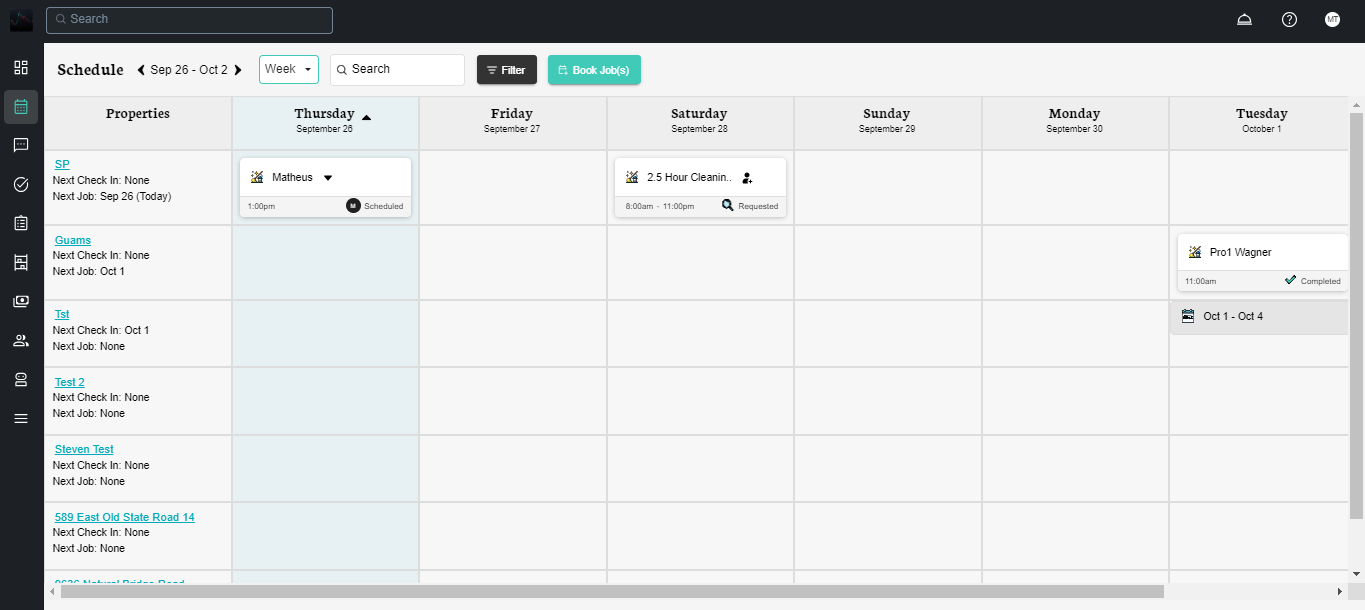
Schedule View Types
TIDY offers five different views for your schedule. You can switch between them using the drop-down menu at the top of the Schedule page. Your chosen view is remembered between visits, so you’ll always return to the view you prefer.
Default View: The default view is 7 Days. If you switch to a different view, TIDY will remember your choice and show that view next time you open the Schedule.
7 Days View
A rolling 7-day view starting from today. This is the default view and is ideal for seeing what’s coming up in the near future.
- Each row represents a property, sorted by the next scheduled event
- Job cards span across days when applicable
- Blocked date ranges appear as hatched bars with a lock badge, sharing lanes with reservations — including half-day checkout/check-in boundaries
- Properties are loaded in batches as you scroll, so large portfolios load quickly
- Click any job or reservation to see its details
- You can assign or change pros directly from job cards
Week View (Mon–Sun)
A traditional 7-column week layout from Monday to Sunday. This view works the same way as the 7 Days view, but is anchored to the calendar week instead of rolling forward from today.
- Sortable by day (ascending or descending)
- Useful when you plan operations around a fixed weekly schedule
Month View
A full calendar grid showing the entire month at a glance.
- Each day cell shows up to 3 job entries. If there are more, click the day to see the full list.
- Reservation indicators show check-in and check-out counts for each day
- Blocked dates show a hatched “Blocked” strip — hover it for a popup, and unblock from the popover or the Block Dates page
- Everything is color-coded by property for quick identification
- Click a day to open a summary of everything happening that day
- Click a specific job to go directly to its details
Day View
A vertical time grid showing a single day from 6am to 10pm in hourly slots.
- The view automatically scrolls to the current time or your earliest scheduled job
- Reservation bars span from check-in to check-out times
- Job cards show their duration proportionally, so you can see at a glance how long each job takes
- Click an empty time slot to book a new job at that time — this is the fastest way to schedule a job for a specific hour
- Properties load in batches as you scroll
List View
A sortable data table for viewing both historical and upcoming jobs. This is the best view for looking back at past work or filtering a large set of jobs.
- Columns include: Service, Date, Time, Property, Status, and Pro
- Click any column header to sort by that column
- Use date range presets (Today, This Week, Last Month, etc.) or pick a custom date range
- Includes both jobs and availability requests
- Click any row to go to the job or request details
Filtering & Search
The filter bar lets you narrow down what you see on the schedule. You can combine multiple filters at once. Your active filters are saved, so they stay in place when you navigate away and come back.
Available filters include:
- Status — Scheduled, In Progress, Having Issues, Requested, Not Accepted, Completed, Cancelled, Pro Cancelled
- Type — Job or Reservation
- Service — Filter by cleaning or other service types
- Address — Filter by physical property address
- Property Name — Filter by custom property nicknames
- Pro — Show only jobs assigned to a specific pro
Selected filters appear as chips below the filter bar, so you can easily see what’s active and remove individual filters by clicking the chip.
Text Search
Use the search box to quickly find properties and jobs by name. The search filters everything currently loaded on the page in real time.
Navigation
- Use the Previous and Next arrows to move between time periods (days, weeks, or months depending on your view)
- In List View, use the Date Range Selector for preset ranges or custom dates
Actions from Schedule
Job Actions
- Book a Job— On mobile, tap the floating "Add Job" button. On desktop, click an empty time slot in Day View, or use the main booking flow.
- View Job Details — Click any job to see its full details
- Reschedule — Change the date, time, pro, or service type for an upcoming job
- Skip or Cancel — Cancel an upcoming job (you’ll be asked to confirm first)
- Mark Complete — Manually mark a job as finished
- Edit Plan — Modify the recurring plan associated with a job (changes the ongoing schedule, not just one job)
- Request Substitute — If a pro cancels or you need a replacement, request a substitute pro
- Keep Only One Pro — For 2-pro jobs, reduce to a single pro if needed
Reservation Actions
- Click a reservation to view its details and a summary of the day
- Set up or manage your PMS integration for automatic reservation syncing
Pro Actions
- View Pro Profile — See details about the assigned pro
- Contact Pro — Call or message the pro directly
- Change Pro — Assign a different pro to the job
- Report No-Show — If a pro didn’t show up, report it so TIDY can help resolve the situation
Availability Request Actions
If you’ve sent an availability request to a pro, you can manage it directly from the schedule:
- Accept — Accept a pro’s offer to take the job
- Counter — Propose different times if the pro suggests times that don’t work for you
- Cancel — Cancel the availability request
Desktop vs. Mobile
The Schedule works on both desktop and mobile, with a few layout differences:
- Desktop: When you click a job or reservation, the details open in a side panel on the right, so you can keep the calendar visible while reviewing details.
- Mobile:Clicking a job or reservation opens the details full-screen. A floating "Add Job" button appears at the bottom of the screen for quick booking.
Integration Points
- Reservations automatically sync from PMS/channel integrations
- Jobs auto-generate based on reservation checkout times
- Maintenance jobs appear when scheduled from Maintenance section
- Recurring tasks populate automatically based on settings