
TIDY Concierge
The Concierge combines our AI agent with 24/7 humans to help.
AI can make mistakes. Please verify important information.
Assigning Pros to Jobs
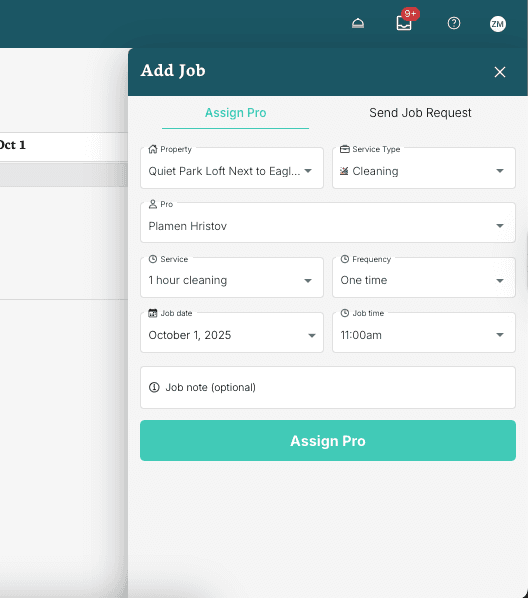
Creating a Job Assigned to a Pro
When creating a job, you can tap "Assign Pro" to have them assigned instantly if you both have it set for "Automatic Assignment".
Assigning Pros to Jobs Once Created
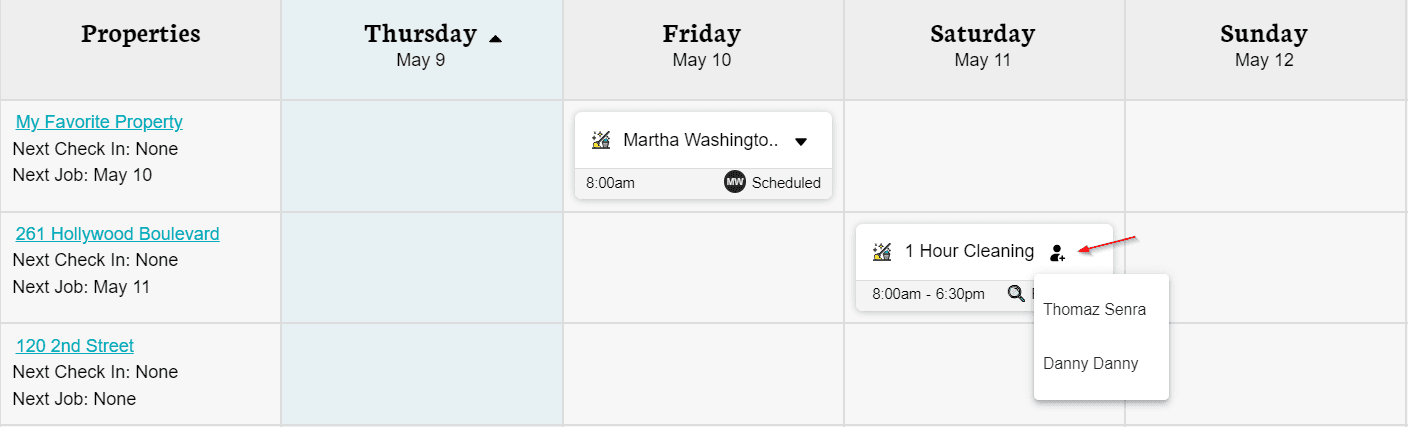
Once you’ve already requested a job, you have the option to assign one of your pros to this job request. Here is how to do so:
- Go to the "Schedule" section of your app
- Find the request on your calendar
- Click on the "Assign Pro" icon
- Select one of the Pros that will appear on the dropdown
- After doing that the job will be logged into their schedule automatically
If you can’t find the pro you wish to assign to the job on the list, please check if the pro has already been added to your account and if they are added to the correct addresses. See more information on "Pros you Add".