
TIDY Concierge
The Concierge combines our AI agent with 24/7 humans to help.
AI can make mistakes. Please verify important information.
HostBuddy AI Integration
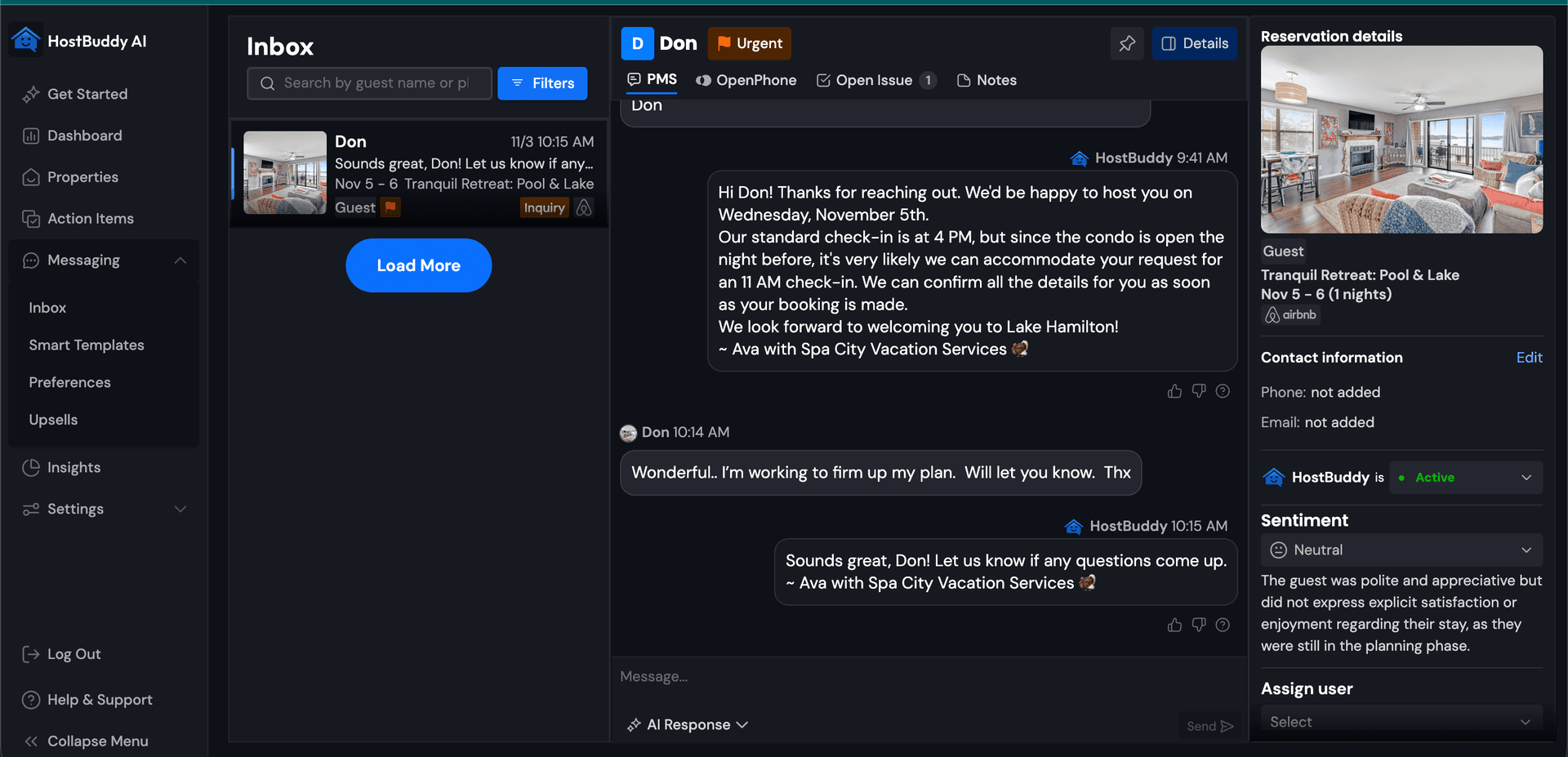
HostBuddy AI is a smart, AI-powered guest messaging platform built for short-term rental operators who want faster responses, happier guests, and more upsell opportunities.
When you connect HostBuddy with TIDY, you bring your cleaning data and guest communication into perfect sync — automating updates, boosting upsells, and giving guests a smoother experience from booking to check-out.
Why Integrate HostBuddy with TIDY?
Connecting the two platforms creates a powerful "talk and act" loop:
- AI-Powered Messaging — Automatically handle check-in instructions, FAQs, and issue resolution in natural, branded language.
- Event-Based Guest Updates — Use live cleaning status from TIDY to trigger timely messages like "Your property is ready early!"
- Automated Upsells — Offer early check-ins, late check-outs, or gap-night bookings the moment your property is clean.
- Smart Escalation — Let AI manage routine conversations while routing complex issues to the right team member.
- Real-Time Visibility — Keep both your team and guests informed about cleaning progress and turnover readiness.
Setup: Connecting TIDY and HostBuddy AI
Step 1: Add Concierge Integration
First, you must add a concierge integration with TIDY if you have not already. We generally recommend letting our team handle the detailed setup. However, if you want to understand the complete process, follow the steps below.
Step 2: Create Workflow in TIDY to Get Webhook
- In your TIDY account, go to Automations
- Click View Workflows
- Create a new workflow using a HostBuddy template
- This will generate a webhook URL for you to use
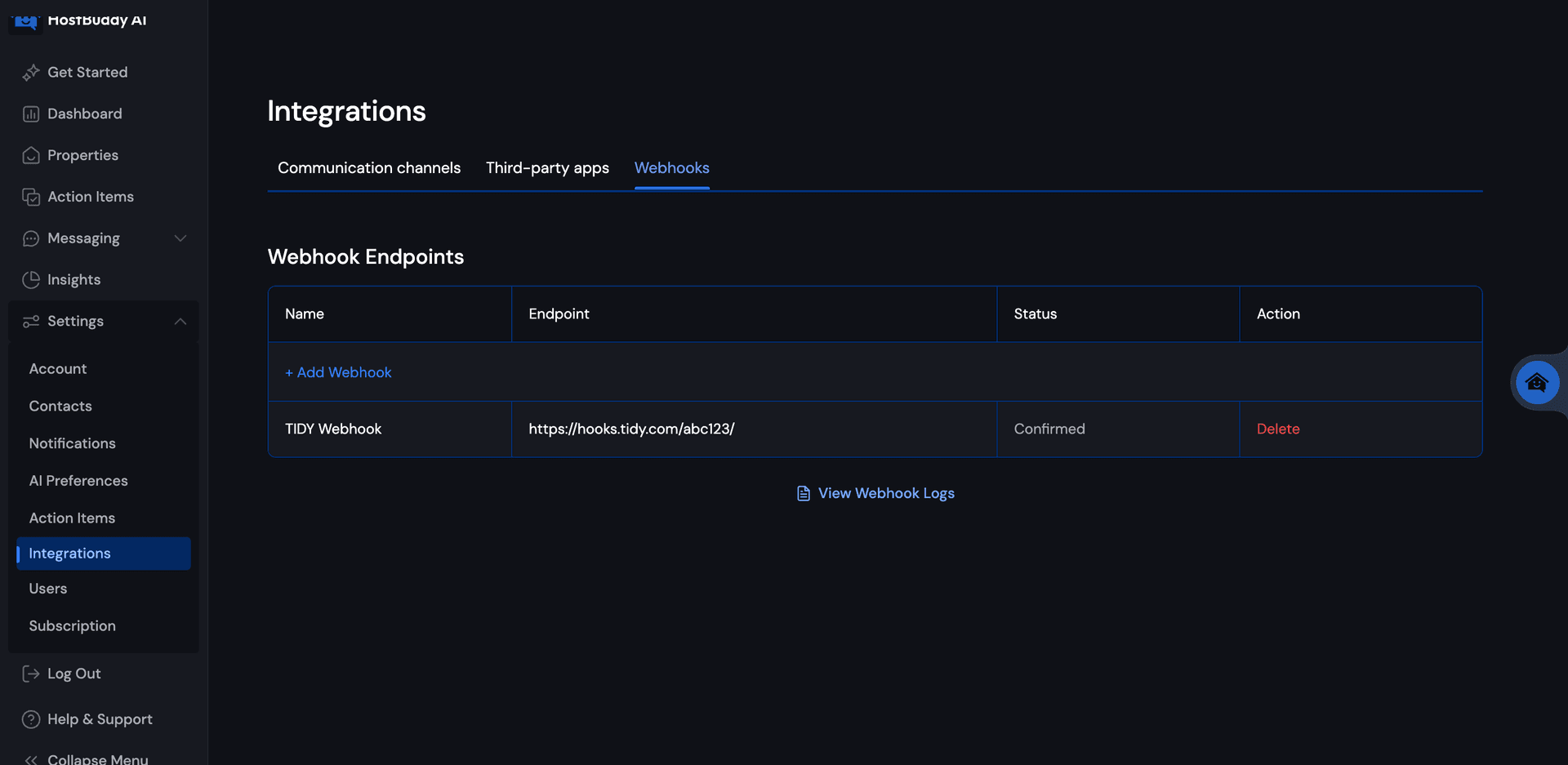
Step 3: Add TIDY Webhook into HostBuddy
In your HostBuddy account, navigate to the webhook configuration and add the TIDY webhook URL you received:
Step 4: Configure Action Item Category for Upsells
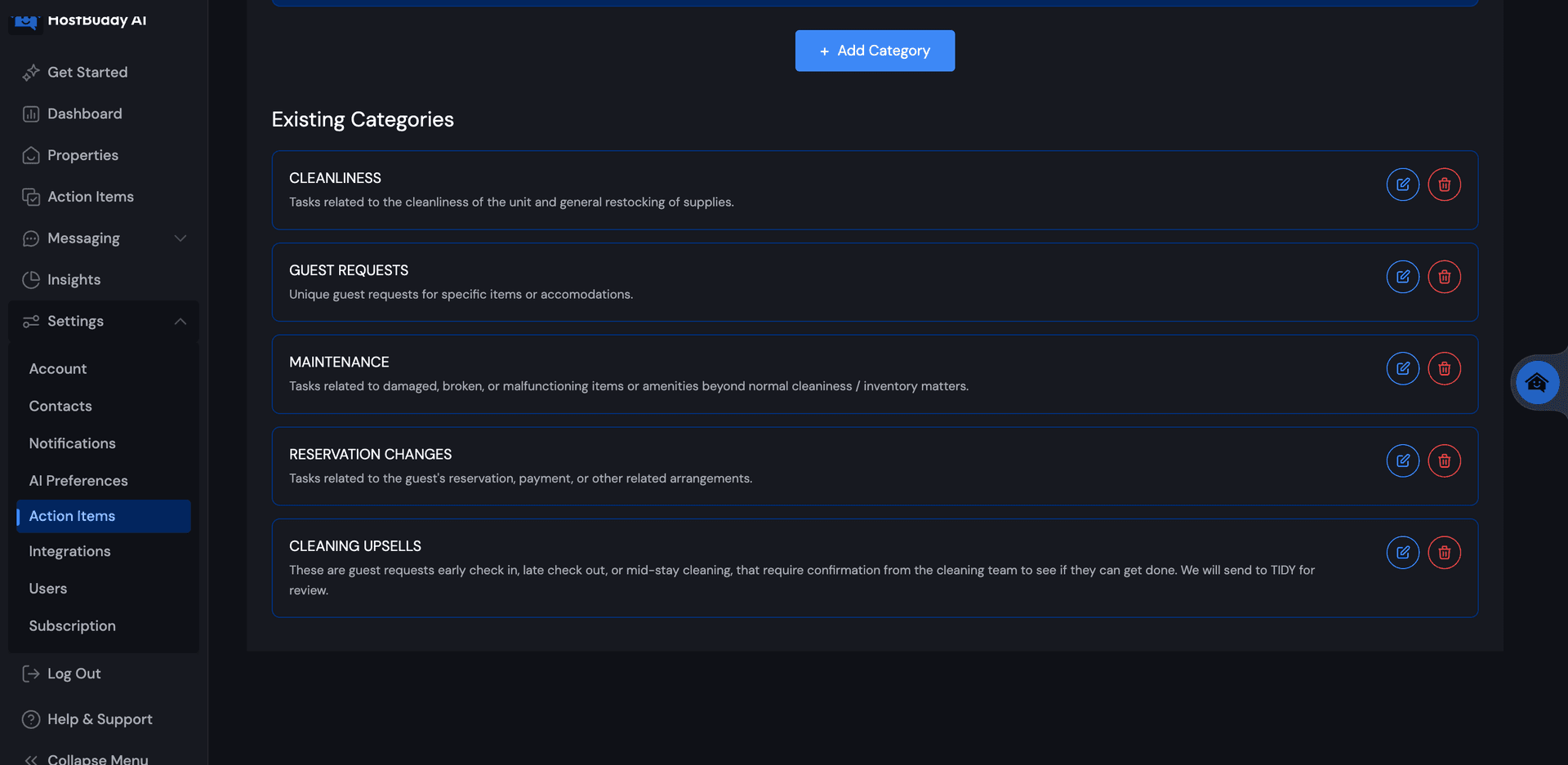
Set up the proper "Action Item Category" for upsells. We recommend using this language:
CLEANING UPSELLS
These are guest requests for early check-in, late check-out, or mid-stay cleaning that require confirmation from the cleaning team to see if they can get done. We will send to TIDY for review.
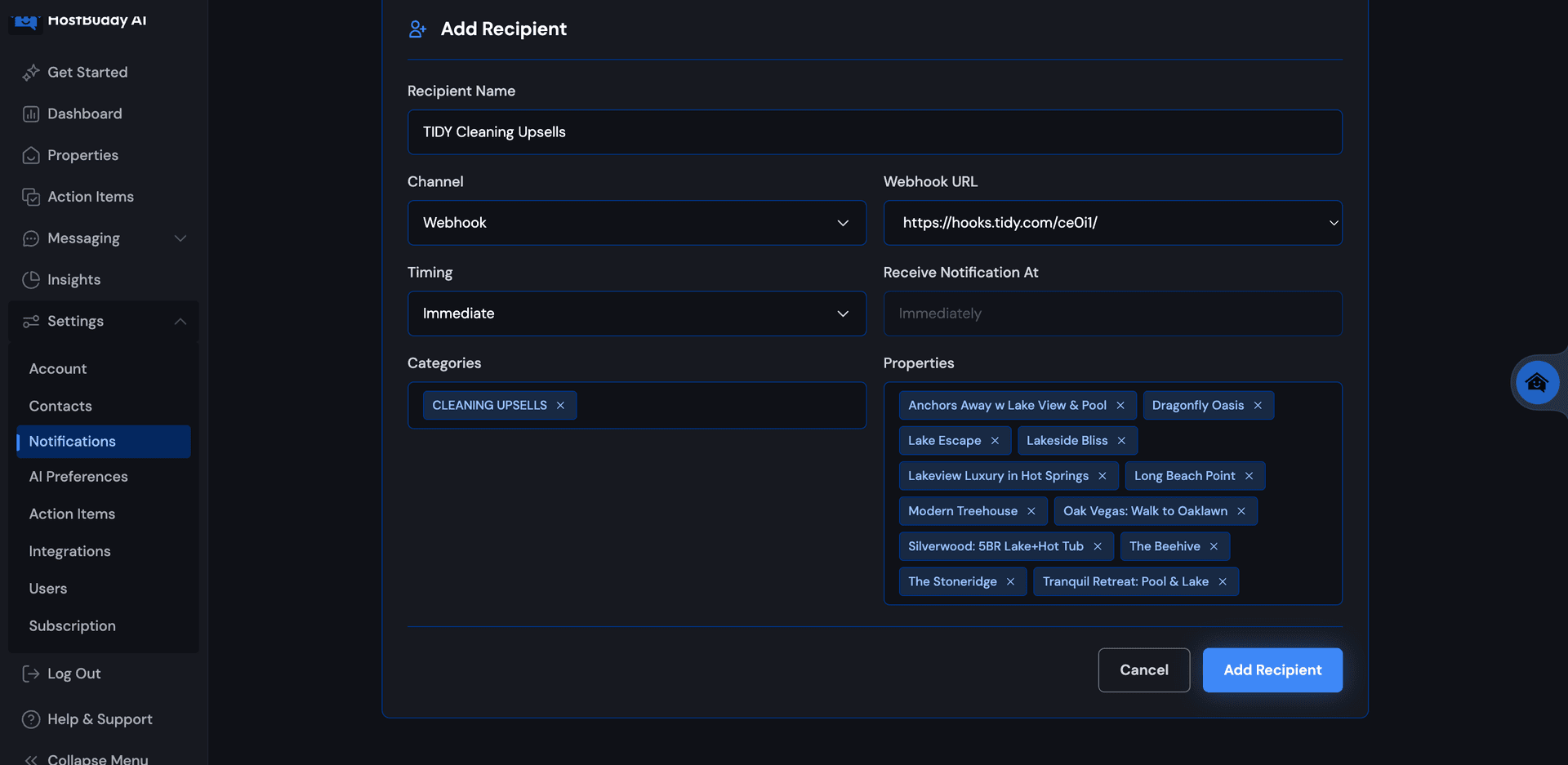
Step 5: Add Notification to Webhook
Add the notification to the webhook for the "Cleaning Upsells" category you just created. This ensures that upsell requests trigger the proper workflow in TIDY.
You're done with the main integration setup!
How the Integration Works
Once live, your messaging becomes cleaning-aware:
- Job Sync — When a TIDY cleaning is marked complete, that status is instantly sent to HostBuddy.
- Automated Guest Messaging — HostBuddy uses this update to send personalized, real-time messages such as "Your property is now ready" or "We can offer early check-in today."
- Upsell Logic — AI detects opportunities for paid extras (late check-outs, additional nights) and offers them automatically.
- Smart Escalation — If a guest message needs a human touch, HostBuddy routes it directly to your team.
- Full-Cycle Tracking — From cleaning completion to guest satisfaction, you have real-time visibility in one connected system.
How Upsells Work When Received
Once the integration is live, upsell requests from guests will trigger notifications in TIDY. Here's how the TIDY team will handle them:
The Workflow
- A guest makes an upsell request (early check-in, late check-out, or mid-stay cleaning) through HostBuddy
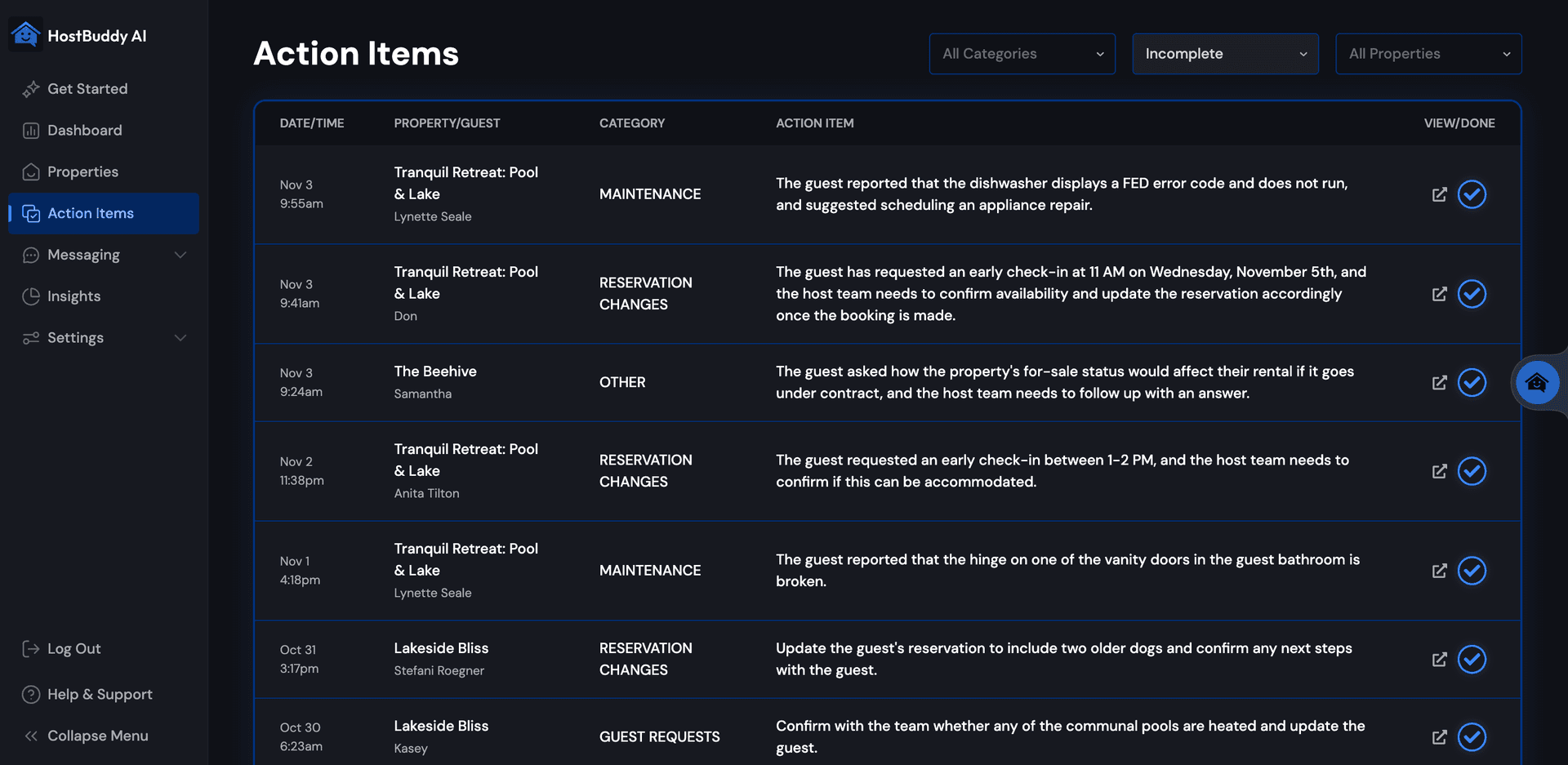
- The request appears as an action item in both HostBuddy and TIDY
- The TIDY team sees the request and responds according to your instructions
- They open the relevant action item in HostBuddy
- They use the "Generate from My Instruction" feature in HostBuddy to create a response
Setting Up AI Response Instructions
Configure how you want HostBuddy's AI to respond to guests based on TIDY's assessment. The TIDY team will paste one of these scenarios into the "Generate from My Instruction" field:
✓ We can accommodate this request
(Optionally with limitations, e.g., they want to check in 2 hours early but only 1 hour early is possible)
💵 We can accommodate this request with an additional fee
✗ We cannot accommodate this request
Important: You need to set up HOW you want upsell requests handled with guests in HostBuddy's AI instruction system. TIDY provides the operational feasibility (can we do it?), but HostBuddy handles the guest-facing communication.
Syncing Maintenance Requests
In addition to upsells, you can sync maintenance requests from HostBuddy to TIDY for automated triage and dispatching. HostBuddy has an existing category for maintenance requests that works similarly to the upsells integration.
Setup Process
- In your TIDY account, go to Automations > View Workflows
- Create a new workflow specifically for maintenance requests using a HostBuddy template
- This will generate a maintenance-specific webhook URL
- In HostBuddy, navigate to the notifications settings
- Add the TIDY maintenance webhook as the destination for the maintenance requests category
How It Works
Once configured, maintenance requests from guests flow seamlessly into TIDY:
- Guests report maintenance issues through HostBuddy's AI
- Requests are automatically sent to TIDY via webhook
- In TIDY, you can set up your procedure for triaging and handling maintenance
- Automate dispatching of your pros based on issue type, priority, or property
- Track maintenance completion and communicate status back to guests
Pro Tip: Set up automation rules in TIDY to route different types of maintenance requests to the appropriate pros automatically, ensuring faster response times and better guest satisfaction.
Alternative Approach: Cleanliness Status Updates Only
If you want a simpler integration, you can use cleanliness status updates instead of the full upsell request workflow described above. However, this approach has significant limitations.
How to Enable
- In your TIDY account, go to Automations
- Click View Workflows
- Find "Upsells – Update HostBuddy with Cleanliness Status"
- Enable it to automatically notify HostBuddy when a property is clean — powering instant upsell offers to guests
Why the Full Integration is Better
Relying only on cleanliness status updates limits what you can do. The full upsell request integration enables TIDY to power enhanced early check-ins, late check-outs, and mid-stay cleanings — unlocking more revenue opportunities.
The Problem with Cleanliness Status Alone
- Still requires a TIDY integration.
- Only tells you when a job is finished.
- Example: if check-in is at 4 PM and a guest requests 1 PM check-in, you can't confirm until cleaning is complete — often too late to upsell.
Enhanced Early Check-Ins
- Re-order or reassign cleanings to accommodate paying guests.
- Offer expected early check-in times in advance, boosting conversion rates.
Late Check-Outs
- Not possible with cleanliness updates alone.
- Requires dynamically moving jobs to account for late departures and upcoming turnovers.
- TIDY makes this seamless.
Mid-Stay Cleanings
- Not possible with cleanliness updates alone.
- With TIDY you can:
- Collect guest-preferred times.
- Send job requests to approved pros.
- Ensure service happens during the guest's stay without manual coordination.
The Bottom Line
Cleanliness updates alone offer limited upsell opportunities — and require a TIDY integration anyway. With no extra cost or effort, you can unlock enhanced upsells (early check-in, late check-out, mid-stay cleanings) and deliver a better guest experience.
Summary
With HostBuddy + TIDY, you’re not just answering guests faster — you’re acting on their needs instantly.
Cleanings trigger communication. Communication drives revenue. Guests stay informed, impressed, and ready to book again.
💡 This workflow helps trigger upsell opportunities and proactive guest communication.